Configuration Topology Tab
Overview
The Configuration Topology tab in the CI Directory visually displays the dependencies of the currently selected CI. It is a single-CI entry point (centered around an individual CI), unlike query-definition-based entry points (CI Topology View, Query Studio preview): this tab focuses on a single CI and by default loads and displays all CIs directly related to it.
The tab provides two modes — Graph View and Table View — toggleable via the switch at the top:
- Graph View: Renders the current CI's dependency relationships as an interactive relationship network graph, further divided into two sub-modes:
- Adjacency View (default): Loads all direct relationships of the current CI at once, displaying upstream/downstream in upper and lower sections
- Explore Mode: Incrementally expands the relationship network on demand and supports topology structure modifications
- Table View: Displays CIs related to the current CI in a list format. See CI Topology for details.
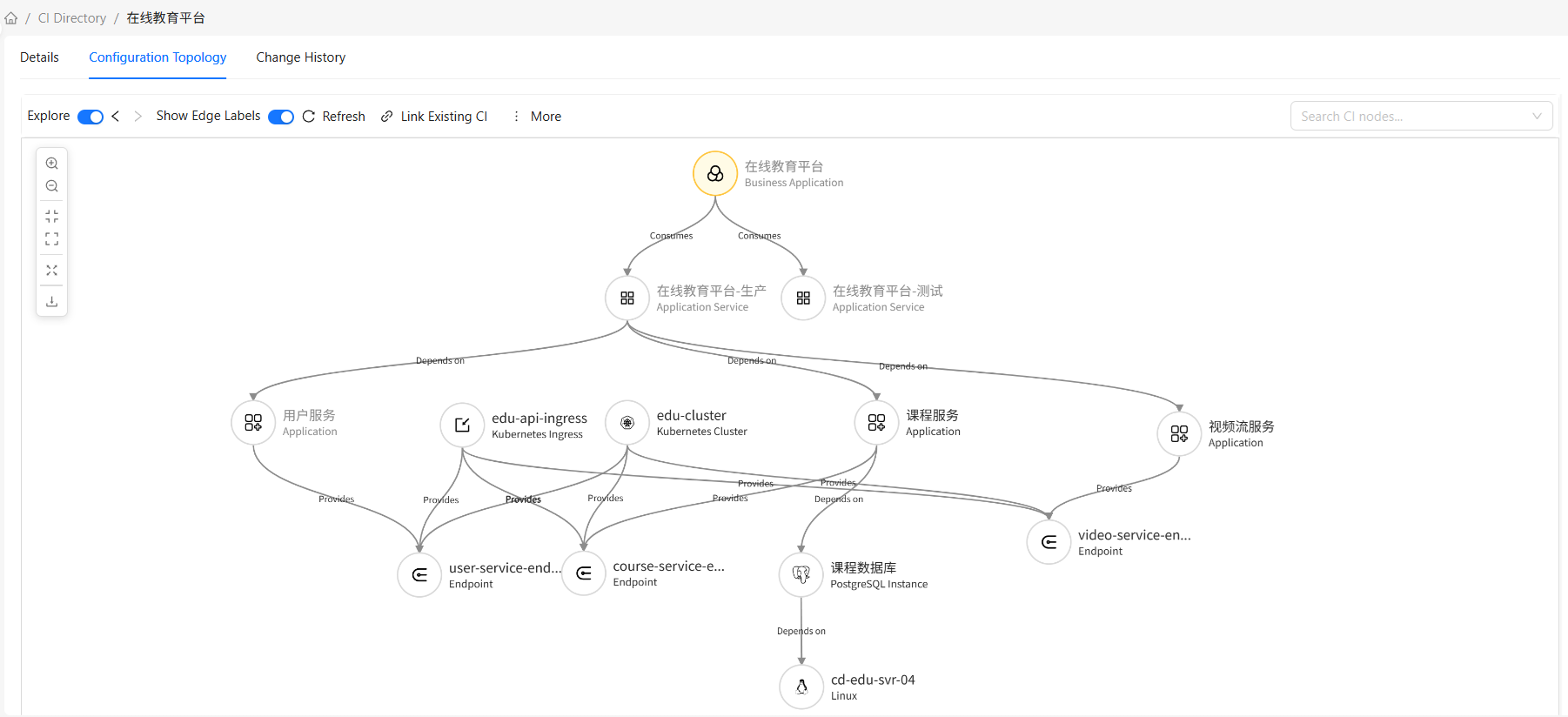
Graph View
Adjacency View (Default)
The Adjacency View loads all CIs directly related to the current CI at once, divided into upper and lower sections by relationship direction:
- Upper nodes: CIs pointing to the current CI (relationship target = current CI; these CIs "are used by the current CI" or "depend on the current CI")
- Lower nodes: CIs that the current CI points to (relationship source = current CI; the current CI "uses" or "depends on" these CIs)
Characteristics:
- Loads all direct relationships at once — no incremental expansion needed
- Supports browsing (view details, search nodes, canvas zoom, export image, etc.) and editing selected node attributes
- Does not support relationship modifications (associate, create, delete nodes and relationships) — switch to Explore Mode for these
Explore Mode
Explore Mode starts from the current CI and incrementally expands the relationship network on demand. For a complete description (exploration flow, exploration panel, history navigation, node count limits, relationship maintenance, etc.), see CI Topology.
The Adjacency View supports browsing operations (view details, search nodes, canvas zoom, export image, etc.) and editing selected node attributes. However, relationship modification operations (associate existing CI, create related CI, delete nodes/relationships) are only available in Explore Mode.
Common Operations
Canvas operations (zoom, fit canvas, fullscreen, download image, toggle layout, etc.), node operations (select, drag, locate, delete), edge operations, node search, history navigation, relationship maintenance, and other common mechanisms are described in CI Topology.
Frequently Asked Questions
Q: What is the difference between Adjacency View and Explore Mode?
A: The Adjacency View loads all direct relationships of the current CI at once, displaying upstream/downstream in upper and lower sections, and supports browsing and editing node attributes. Explore Mode expands on demand, allowing you to incrementally focus on key paths, and supports relationship modification operations (associate, create, delete). For a complete comparison, see CI Topology.
Q: What can / can't the Adjacency View do?
A: Can do — browse all direct relationships, view node details, search nodes, canvas zoom, export image, edit node attributes. Cannot do — relationship modification operations (associate existing CI, create related CI, delete nodes/relationships); these operations require switching to Explore Mode.
Q: Can the Adjacency View show indirect relationships (e.g., C in A -> B -> C)?
A: No. The Adjacency View only loads nodes directly connected to the current CI. To view indirect relationships, switch to Explore Mode and incrementally expand from the current CI.