CI Relationship Type
Overview
Relationship types define the kinds of associations that can be established between configuration items, describing how one CI is connected to another.
Key Concepts:
- CI Type: Defines "what it represents", such as
Application,Computer,Database, etc. - Relationship Type: Defines "how it connects", such as
Depends On,Runs On,Contains, etc. - Valid Link: Defines which CI types can establish which relationship types, configured in the "Relationships" tab of CI Type Management
Example:
- The relationship type
Runs Ondefines the semantic meaning of "a runs on b" - A valid link configures "the Database type can connect to the Computer type via the Runs On relationship"
- An actual instance: Database "MySQL-01" --Runs On--> Computer "Server-01"
What this module can do for you:
- View system predefined relationship types (e.g.,
Depends On,Runs On,Contains, etc.) - Create custom relationship types
- Edit or delete custom relationship types
- Import and export relationship type definitions
Interface Layout
The Relationship Type Management page uses a left-right split layout:
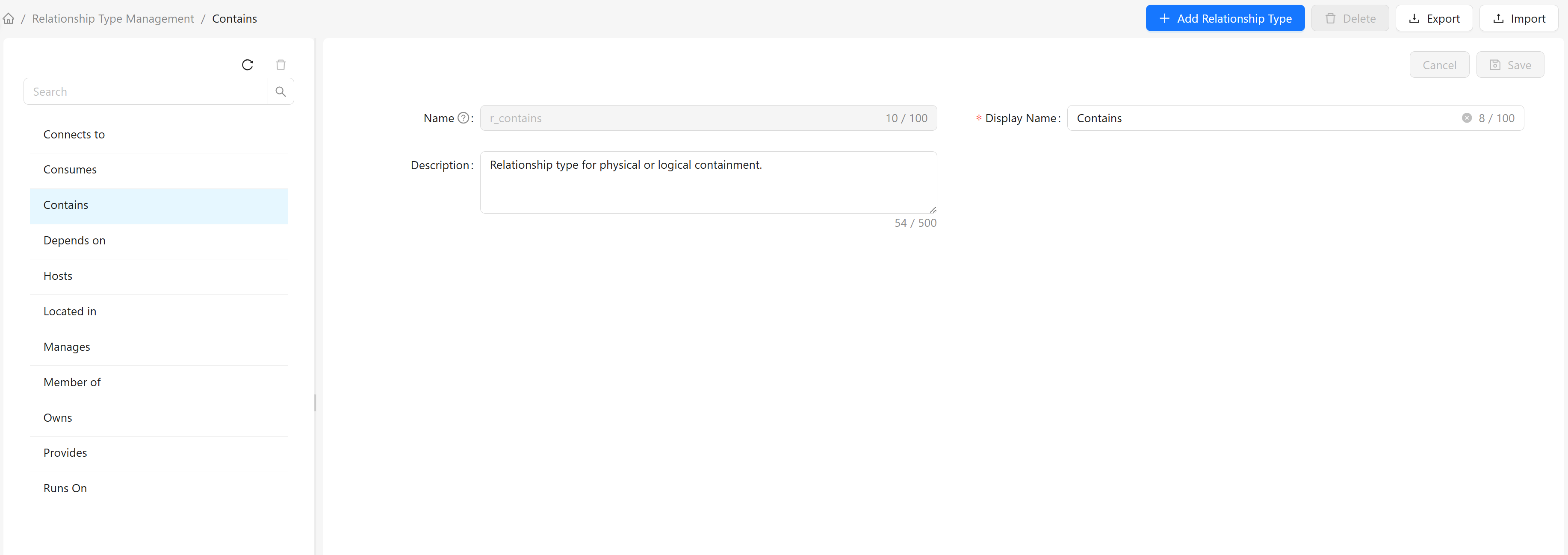
Left: Relationship Type List
The left side displays the list of relationship types:
- Built-in Types: System predefined relationship types, such as
Depends On,Runs On,Contains, etc. - Custom Types: User-created relationship types
Right: Type Details
The right side displays detailed information about the selected relationship type:
- Name: Unique identifier of the relationship type
- Display Name: Name displayed in the interface
- Description: Description of the relationship type
How to Use
View Relationship Types
- Click any relationship type in the left list
- The right side displays detailed information about that relationship type
- The name cannot be modified; the display name and description can be edited
Search Relationship Types
Use the search box above the left list:
- Enter the relationship type name in the search box
- The list automatically filters to show only matching relationship types
- Clear the search box to restore the full list
Create a New Relationship Type
- Click the "Add Relationship Type" button in the top toolbar
- Fill in the relationship type information in the popup dialog:
- Name: Unique identifier for the relationship type (must start with a letter, only letters, numbers, and underscores allowed)
- Display Name: Display name for the relationship type
- Description: Description of the relationship type's purpose (optional)
- Click "OK" to complete the creation
Edit a Relationship Type
- Select the relationship type you want to edit in the left list
- Modify the display name or description in the right detail panel
- After modification, click the "Save" button
Delete a Relationship Type
- Select the custom relationship type you want to delete in the left list
- Click the "Delete" button above the list
- Confirm the deletion
Note: Only custom relationship types can be deleted. If the relationship type is used by existing valid links, it cannot be deleted.
Export Relationship Types
- Select the relationship type(s) you want to export in the left list
- Click the "Export" button in the top toolbar
- The system automatically downloads a JSON file containing the relationship type definition(s)
Import Relationship Types
- Click the "Import" button in the top toolbar
- Select the JSON file to import in the popup dialog
- To overwrite existing relationship types, check "Overwrite existing relationship types"
- Click "Confirm Import" to complete the operation
Built-in Relationship Types
The system provides the following built-in relationship types:
| Name | Display Name | Description |
|---|---|---|
r_depends_on | Depends On | Functional dependency relationship, used for fault impact analysis |
r_runs_on | Runs On | Indicates that software/application runs on a specific platform or system |
r_contains | Contains | Physical or logical containment relationship |
r_member_of | Member Of | Cluster membership or organizational affiliation relationship |
r_hosts | Hosts | Physical host or container platform hosting of upper-layer resources |
r_connects_to | Connects To | Network connection relationship |
r_provides | Provides | Relationship for providing services, resources, or supplies |
r_consumes | Consumes | Consumption or usage relationship |
r_located_in | Located In | Physical location relationship |
r_owns | Owns | Ownership relationship |
r_manages | Manages | Management relationship |
Strong Dependency Relationships
Certain relationship types have a "strong dependency" characteristic, defining mandatory attachment relationships between CIs. Some CIs (such as databases, disks) must be attached to other CIs to be created and cannot exist independently.
Purpose of the Attached CI Attribute:
Attached CI(attached_to) is a system attribute defined on the root CI type- It records the ID of the CI that the current CI is attached to
- It is automatically set by the system when creating a strong dependency relationship and cannot be manually modified after creation
Supported Strong Dependency Relationship Types:
| Relationship Type | Attachment Direction | Description |
|---|---|---|
Runs On (r_runs_on) | Forward | The source CI is attached to the target CI. For example: a database instance is attached to a computer or database cluster |
Contains (r_contains) | Reverse | The target CI is attached to the source CI. For example: a disk is attached to a computer |
Usage Notes: Each CI type can define multiple strong dependency relationships in its "Relationships" configuration. For example, Database can define both Runs On Computer and Runs On Database Cluster, meaning that when creating a database instance, you must select an instance of one of these types as its attached CI.